Have you found yourself downloading a critical file from MEGA only to encounter the frustrating "transfer quota exceeded" message? This is a widespread issue that affects countless users who suddenly find their downloads blocked due to quota limitations.
Being stopped mid-download with a notification stating you've exceeded your transfer allowance can be incredibly disruptive, particularly when time-sensitive files are involved. If you're searching for dependable solutions to work around this obstacle, this comprehensive guide is here to help. We'll explore proven methods to overcome these restrictions and resume your downloads seamlessly.
Understanding MEGA's Current Transfer Restrictions
MEGA stands out by offering substantial free cloud storage capacity, but this generosity comes with notable limitations regarding download volumes within specified timeframes. These restrictions are commonly known as transfer quotas. Free account holders typically face limits between 1 GB and 5 GB every several hours, though these figures may vary depending on server capacity and current demand.
The platform monitors data consumption by tracking your IP address. When you reach your allocated quota from a specific IP address, MEGA implements a temporary block on additional downloads from that location until the restriction window passes, which generally lasts several hours.
This system exists to manage server infrastructure efficiently and encourage users toward paid Pro subscription tiers. While this approach makes business sense, it creates significant inconvenience for users who occasionally need larger downloads but don't justify a continuous subscription.
Four Effective Methods to Circumvent MEGA's Download Caps
Below, we'll examine four distinct approaches to resetting your MEGA transfer allowance. Each strategy offers unique advantages and drawbacks, allowing you to select the most suitable option for your circumstances.
Methods to Overcome MEGA's Transfer Limits
- Wait approximately 6 hours for automatic quota restoration
- Purchase a MEGA Pro subscription plan
- Power cycle your router to obtain a new IP address
- Connect through a VPN service
Allow 6 Hours for Automatic Quota Reset
The most straightforward approach requires no additional tools or software—simply wait for the automatic reset. MEGA's system is configured to automatically restore download quotas for each IP address after a predetermined interval.
This reset period typically spans approximately six hours. Consequently, if your download isn't time-sensitive, you can simply pause and resume later.
Advantages
- Accessible to everyone without technical knowledge
- Completely free of charge
Disadvantages
- Unsuitable for urgent download requirements
- Reset duration may exceed six hours during peak network congestion
Upgrade to MEGA Pro Subscription
MEGA's official recommendation involves subscribing to one of their Pro tier plans. While free accounts are restricted to a strict 5GB daily transfer cap, upgrading dramatically expands this allowance.
Various plan tiers provide transfer quotas ranging from 1TB to 16TB monthly—a massive increase compared to free accounts. This represents the most dependable and consistent solution for users who regularly manage large file transfers or require MEGA as their primary cloud storage platform, rather than occasional file sharing.
Advantages
- Official solution ensuring reliable connectivity
- Enhanced security and peace of mind
Disadvantages
- Requires recurring monthly payments, potentially not cost-effective for users only needing occasional quota bypasses
Reset Your Router for a Fresh IP Address
Depending on your internet configuration, you might successfully reset the restriction by power cycling your router. This method works because numerous internet service providers utilize "dynamic IP address" systems.
Dynamic IP addresses are automatically distributed by your provider and frequently change when you restart your networking equipment. By leveraging this mechanism, MEGA perceives your refreshed IP address as belonging to a new user, effectively resetting your download allowance.
Advantages
- Free solution requiring no additional software installation
Disadvantages
- Some providers don't reassign IP addresses immediately
- Ineffective with static IP address contracts
- Physical router reboots can be inconvenient, temporarily disconnecting all household devices from the internet
Utilize a VPN Service
A Virtual Private Network (VPN) establishes secure, encrypted connections across the internet. When utilizing a VPN, your internet traffic routes through servers positioned in different global locations, enabling quick and repeated IP address changes.
Upon reaching MEGA's download threshold, you simply activate your VPN application, switch to an alternate server location in another country or region, and receive a fresh IP address. Afterward, refresh your MEGA page, and your download quota resets, allowing immediate resumption of your file transfer.
Advantages
- IP address changes accomplished with minimal clicks
- Premium VPN services with extensive server networks enable virtually unlimited downloads
Disadvantages
- VPN service subscriptions require payment (though typically less expensive than MEGA Pro plans)
- Free VPN services generally deliver poor speeds and present significant security vulnerabilities
How VPNs Successfully Bypass MEGA's Limitations
Virtual Private Networks prove remarkably effective for navigating MEGA's transfer restrictions.
Understanding why requires examining VPN fundamentals and their interaction with services like MEGA.
Understanding VPN Technology
A VPN creates secure, encrypted tunnels between your device and the internet. Upon connecting to a VPN, your internet traffic flows through remote servers operated by your VPN provider. This process effectively conceals your genuine IP address, replacing it with the VPN server's IP address. Your online activities become associated with the server's location and IP rather than your actual details, substantially improving your digital privacy and security.
The Mechanism Behind VPN Effectiveness
As mentioned earlier, MEGA's enforcement system tracks data volumes downloaded from each unique IP address. When employing a VPN, you modify your public-facing IP address.
Here's how it works: after reaching your download limit on MEGA, simply disconnect from your current VPN server and establish a connection with a different one. This action provides you with a completely new IP address. From MEGA's perspective, this appears as though an entirely new user is initiating a download. This allows you to reset the download quota associated with your connection, enabling you to continue transferring files without extended waiting periods. Essentially, VPNs provide access to extensive IP address pools, making them straightforward and highly effective tools for navigating platform IP-based restrictions.
Step-by-Step Guide: Using a VPN to Bypass MEGA's Restrictions
Employing a VPN to circumvent download limitations is remarkably straightforward. Follow these three simple steps to resume downloading your files without interruption.
Quick Solution: Bypassing MEGA's Download Limitations
- Download a VPN service likeExpressVPN.
- Log in to the VPN app and connect to a VPN server
- Launch the MEGA app and download the desired data
Step 1: Create Your ExpressVPN Account
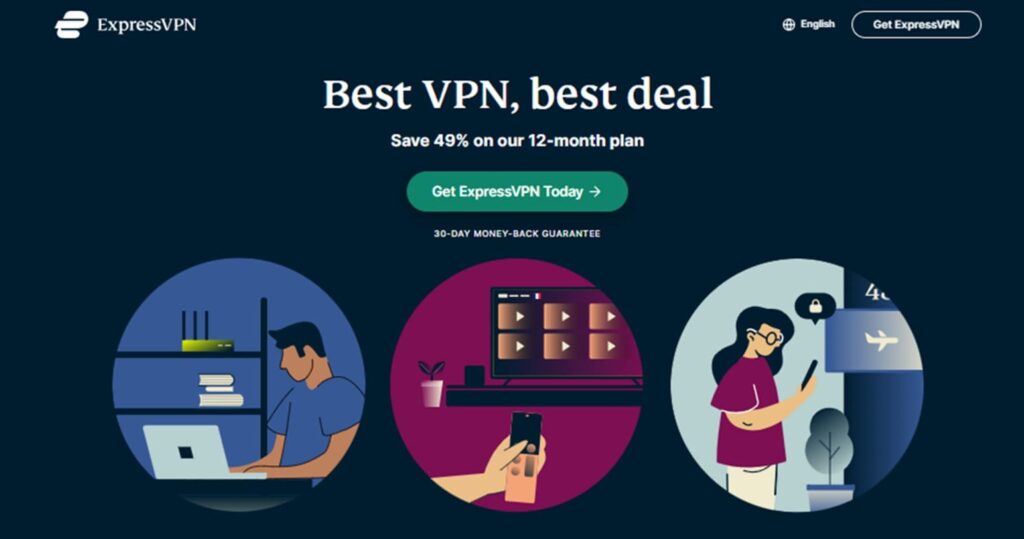
To create an account with ExpressVPN, click the "Get ExpressVPN Today" button shown below.
After viewing the pricing plans, follow the provided instructions to complete your registration.
Step 2: Download the Application and Connect to a European Server (UK)
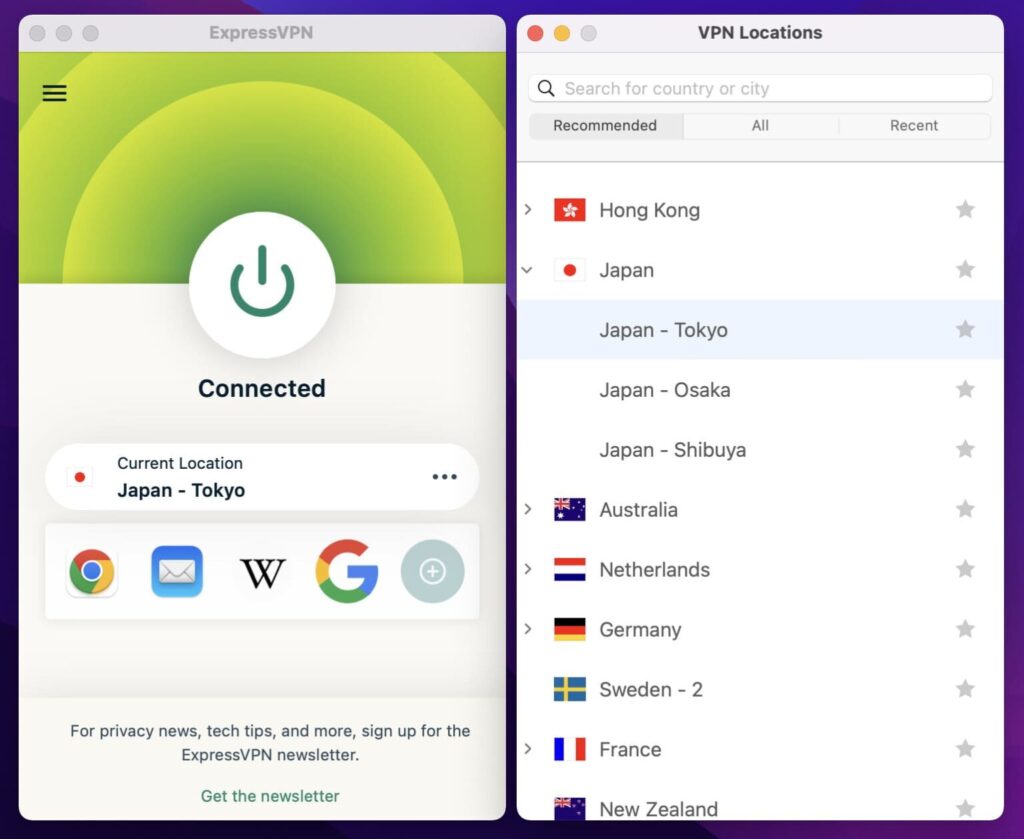
After completing your ExpressVPN registration, download and launch the application. Next, click the "..." button within the app and type "Japan" in the search field.
If connecting from Germany, simply type "Germany" instead.
Select your preferred server and click the power icon located in the center. You can now establish a connection to a Japan-based server.
STEP 3: Access MEGA and Download Your Files
With the VPN connection active, open MEGA through your web browser or via their desktop application. Locate the file you wish to download and initiate the transfer process. You should be able to download as though you were a completely new user. If you encounter the download limit again, simply return to your VPN application, disconnect from your current server, and establish a connection with a different one. This will assign you a fresh IP address, allowing you to continue downloading from MEGA seamlessly.
\【Get +3 months free】/
Best VPN Services for MEGA Download Workarounds
Selecting an appropriate VPN is crucial for optimal performance. Speed, server availability, and security represent key considerations.
Below are some of the most trustworthy VPN services that excel at bypassing MEGA's download restrictions.
ExpressVPN
|
Pricing |
1 Month: $12.95/month ※ Subscribe to the 12-month plan through our exclusive website link and receive an additional 3 months free. |
|
No-Logs Policy and Kill Switch |
Yes |
|
Number of Servers |
3,000+ |
|
Countries with Server Coverage |
105 |
|
Money-Back Guarantee Period |
|
|
24/7 Customer Support |
Yes |
|
Simultaneous Device Connections per Account |
8 Devices |
|
Company Headquarters |
British Virgin Islands |
ExpressVPN stands as one of the world's two leading VPN service providers, serving over 4 million paying subscribers. This service has earned exceptional ratings and popularity due to its outstanding connection speeds and reliability. Our comprehensive testing confirms these claims. ExpressVPN operates an extensive network of high-speed servers across 105 countries, providing users with diverse connection options. We have personally verified that even in China, known for its "strict internet controls," ExpressVPN maintains accessible servers for reliable connections.
Unlike most VPN applications that typically require 30-60 seconds from startup to server connection, ExpressVPN's client completes the entire process from program launch to server connection in approximately 10 seconds, eliminating waiting time and delivering an exceptional user experience.
ExpressVPN maintains a strict no-logs policy, never recording or tracking user VPN activity. The service also provides robust security protection, effectively blocking intrusive advertisements, malicious websites, and harmful blocking software.
|
Advantages |
Disadvantages |
|
|
ExpressVPN is Particularly Suitable for These User Groups
- Users with high network speed requirements
- Individuals who value user reputation and prefer well-established VPN services
\【VPN BOX Special Offer】/
Get an Additional 3 Months Free!
How Good is ExpressVPN? Comprehensive Analysis of Pros, Cons, and Security Features
NordVPN
|
Pricing |
1 Month: $12.99/month |
|
No-Logs Policy and Kill Switch |
Yes |
|
Number of Servers |
5,800+ |
|
Countries with Server Coverage |
60 |
|
Money-Back Guarantee Period |
|
|
24/7 Customer Support |
Yes |
|
Simultaneous Device Connections per Account |
10 Devices |
|
Company Headquarters |
Republic of Panama |
NordVPN has achieved the largest global market share through its premium service quality and exceptional balance between pricing, internet speed, server count, and geographical coverage. This VPN service has consistently maintained outstanding reputation among industry professionals and users alike. NordVPN prioritizes user privacy by implementing a strict no-logs policy and incorporates security features such as kill switch protection. The service provides round-the-clock customer support, ensuring users receive assistance whenever needed.
NordVPN operates over 5,800 servers across 60 countries, offering users extensive options to change their IP addresses to different nations according to their requirements.
After completing registration on the NordVPN official website, users can easily browse the internet securely with NordVPN by simply downloading their application.
|
Advantages |
Disadvantages |
|
|
NordVPN is Particularly Suitable for These User Groups
- Users seeking value for money who want optimal balance between pricing and internet speed
- Individuals who prefer using VPN services with the largest market share
\ 30-Day Money-Back Guarantee! /
How Good is NordVPN? Is It Worth Using? Detailed Analysis of Pricing and Pros & Cons
Surfshark
|
Pricing |
1 Month: $12.95/month |
|
No-Logs Policy and Kill Switch |
Yes |
|
Number of Servers |
3,200+ |
|
Countries with Server Coverage |
100 |
|
Money-Back Guarantee Period |
|
|
24/7 Customer Support |
Yes |
|
Simultaneous Device Connections per Account |
Unlimited |
|
Company Headquarters |
British Virgin Islands |
Surfshark launched in 2018 as a newcomer to the VPN service industry, yet has rapidly gained popularity and earned an excellent global reputation through its competitive pricing and impressive performance capabilities within a remarkably short timeframe.
Compared to ExpressVPN and NordVPN, Surfshark may occasionally experience connection delays and has somewhat limited geo-blocking bypass capabilities, but it offers a significant pricing advantage. By selecting the 24-month plan, users can obtain VPN services at substantially lower costs than both ExpressVPN and NordVPN. Additionally, Surfshark places no restrictions on device connection numbers, enabling you and your family to use the service simultaneously across all devices.
Surfshark operates over 3,200 servers across 100 countries and regions, providing users with abundant choices for IP address changes. The service also implements secure no-logs policies, includes kill switch functionality, and offers 24/7 customer support.
After completing registration on the official website, users can easily and securely browse the internet by downloading the Surfshark application compatible with their devices.
|
Advantages |
Disadvantages |
|
|
Surfshark is Particularly Suitable for These User Groups
- Budget-conscious users who don't require extremely high connection speeds and communication stability
- Families or teams needing to connect multiple devices
\ 30-Day Money-Back Guarantee! /
How Good is SurfsharkVPN? In-Depth Review and Pros & Cons Analysis
CyberGhost
|
Pricing |
1 Month: $12.99/month |
|
No-Logs Policy and Kill Switch |
Yes |
|
Number of Servers |
9,600+ |
|
Countries with Server Coverage |
91 |
|
Money-Back Guarantee Period |
|
|
24/7 Customer Support |
Yes |
|
Simultaneous Device Connections per Account |
7 Devices |
|
Company Headquarters |
Romania |
CyberGhost represents a powerful VPN service that excels particularly in unblocking access to specific websites. Through servers specifically optimized for Netflix access, users can experience ultra-fast connection speeds and buffer-free streaming entertainment. CyberGhost operates an extensive server network with over 9,600 servers deployed across 91 countries and regions, making it an excellent choice for cross-regional Netflix and streaming platform access.
Furthermore, selecting the 24-month package offers remarkably affordable pricing while providing an extended 45-day money-back guarantee period, which exceeds the industry standard of 30 days.
|
Advantages |
Disadvantages |
|
|
CyberGhost is Particularly Suitable for These User Groups
- Netflix enthusiasts seeking to bypass geographical restrictions and access global Netflix content libraries
- Users who desire an extended trial period for comprehensive service evaluation
\ 45-Day Money-Back Guarantee! /
How Good is CyberGhost VPN? Is It Worth Using? Comprehensive Review
Private Internet Access
|
Pricing |
1 Month: $11.95/month |
|
No-Logs Policy and Kill Switch |
Yes |
|
Number of Servers |
Not Disclosed |
|
Countries with Server Coverage |
84 |
|
Money-Back Guarantee Period |
|
|
24/7 Customer Support |
Yes |
|
Simultaneous Device Connections per Account |
Unlimited |
|
Company Headquarters |
United States |
Private Internet Access (abbreviated as PIA) maintains a solid third position in market popularity, following ExpressVPN and NordVPN. This excellent reputation has enabled PIA to secure a considerable global market share. PIA is renowned for its relatively long-standing history in the industry, while offering highly competitive pricing that makes it a more economical alternative to both ExpressVPN and NordVPN. Users who choose the 36-month plan can enjoy premium VPN services at significantly lower costs compared to these two major competitors.
|
Advantages |
Disadvantages |
|
|
PIA is Particularly Suitable for These User Groups
- Users who prioritize budget considerations and brand recognition
\ 30-Day Money-Back Guarantee! /
How Good is Private Internet Access (PIA)? Is It Worth Using? Comprehensive Review
Frequently Asked Questions
Below are responses to common questions regarding the use of VPNs for bypassing MEGA's download restrictions.
Are free VPN services safe to use?
While free VPN services might seem attractive, they're generally not recommended for this purpose. Free VPN providers typically come with significant limitations that can create more frustration than value.
Limitations of Free VPN Services
- Data Restrictions: Most free VPNs enforce their own stringent data caps, which can be even more limiting than MEGA's quota system
- Reduced Speeds: Their servers are frequently overcrowded, resulting in extremely slow download speeds that render large file downloads impractical
- Security Concerns: Some free VPNs have been discovered logging user data and selling it to third parties, or even containing malicious software
- Minimal Server Options: They offer very limited server selections, and these IP addresses are often already blocked by services like MEGA due to excessive use
Considering these substantial limitations, investing in an affordable, reputable paid VPN represents a far more reliable and secure approach.
Is using a VPN to bypass MEGA's quota against the law?
The legal aspects of this practice can be somewhat complex. In most jurisdictions, using a VPN for privacy and security purposes is entirely legal. Bypassing a service's download quota typically exists in a legal gray area. While it's unlikely to constitute a criminal offense, it may violate MEGA's terms of service. This could potentially result in account suspension, although such cases appear to be uncommon.
The crucial legal distinction centers on the content being downloaded. If you're utilizing a VPN to download copyrighted material without proper authorization, that activity is illegal, regardless of VPN usage. Therefore, the primary legal concern relates to copyright infringement rather than the act of using a VPN itself.
Final Thoughts
Encountering MEGA's download restrictions can present a substantial obstacle, but a dependable VPN offers an effective and straightforward solution. By concealing your IP address, a VPN enables you to reset your transfer quota, allowing you to continue downloading large files without extended waiting periods.
When selecting a VPN, it's advisable to choose a reputable paid service rather than a free alternative to ensure superior speeds, enhanced security, and unlimited data transfers. Services like ExpressVPN, NordVPN, and others featured in this guide provide the performance and server diversity necessary for a seamless experience. By following the straightforward steps of connecting to a VPN server, you can easily navigate around these restrictions. Just remember to remain mindful of MEGA's terms of service and utilize these tools responsibly and in accordance with applicable laws.